Upload App Build From Terminal in One Command
AppShare CLI brings the whole upload flow into a single command. Point it at your .apk or .ipa and get the install link back, whether you’re pushing manually or wiring it into a script.
No dashboard needed
Fits any pipeline
One API key
Instant shareable link
Setup
Three Steps, Start to Finish
- 1
Install the AppShare CLI
npm install -g zunoy-appshare-cli
- 2
Authenticate With Your API Key
export APPSHARE_API_KEY="your_api_key_here"
- 3
Upload Your Build
appshare ./build/app-release.apk --app-id my-app-slug
FROM TERMINAL
Skip the Dashboard
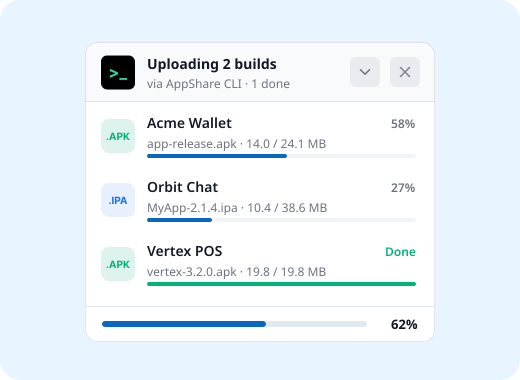
Every time you upload app build from terminal, it works the same way as dragging a file into the browser, just from a single command.
No browser tab, no login screen in the way
Same shareable link the dashboard gives you
All app details validated before upload
AUTOMATION
Connect Your CI/CD Pipeline
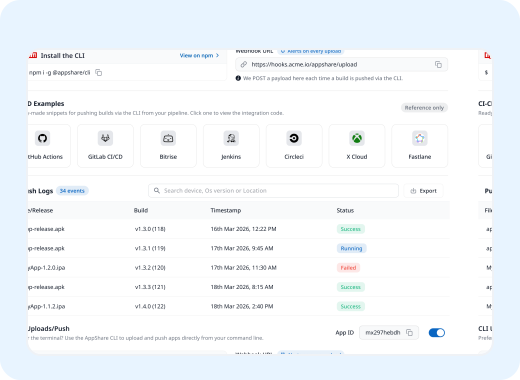
The CLI is what your CI/CD integration calls behind the scenes, so every merge or tag can upload a fresh build on its own.
Automate APK upload on every merge
Automate IPA upload on every tag
7 CI/CD platforms supported today
No manual upload step once it's wired in
Still Have Questions?
How do I upload an app build from the terminal?
Install the CLI with npm install -g zunoy-appshare-cli, set your API key as the APPSHARE_API_KEY environment variable, then run appshare followed by your build path and --app-id. AppShare uploads the .apk or .ipa, applies your release settings, and returns the same install link the dashboard would give you.
Do I need CI/CD set up to use the CLI?
No. The CLI works on its own, so you can push a build from your terminal or a simple script without any pipeline in place. When you are ready to automate, the same command runs inside GitHub Actions, GitLab CI/CD, Bitrise, Jenkins, CircleCI, Xcode Cloud, or Fastlane, with nothing extra to install on the AppShare side.
How do I automate APK and IPA uploads?
Add the AppShare CLI command as a step in your pipeline, right after the build step, with your API key stored as a secret. Every merge or tag then uploads the new .apk or .ipa automatically and returns an install link. AppShare supports GitHub Actions, GitLab CI/CD, Bitrise, Jenkins, CircleCI, Xcode Cloud, and Fastlane.
Is AppShare CLI a Fastlane alternative?
For uploading and sharing builds, yes. For building and signing, no. AppShare CLI takes a finished .apk or .ipa and turns it into an install link, so it can replace the distribution step in a Fastlane setup. Fastlane still handles builds, code signing, and store submission, and AppShare integrates with Fastlane if you want to keep both.
Is the CLI available on the Free plan?
Yes. CLI access is included on every plan, including Free, along with CI/CD integration and unlimited releases. Upload size follows your plan, from 300MB per build on Free up to 2GB on Business, and the number of active apps you can push to ranges from 3 on Free to 50 on Business.
Get Started
Stop Switching Tabs to Ship a Build
Every step you'd normally click through, upload, release settings, install link, fits into one line once AppShare CLI is installed. Set it up once, and pushing your next build takes about as long as typing the command.
Free plan available
No CI/CD required
One API key, every push